
Why Your Ecommerce Site Search Is Losing You Sales (And How to Fix It)
If you run an online store, your site search bar is either quietly making you money or quietly costing you it. There’s rarely a middle ground.
Shoppers who use site search convert at up to 6 times the rate of those who browse, according to research by the Nielsen Norman Group. They arrive knowing what they want, they type it in, and they buy if you can show them the right product fast enough. The question is whether your search is up to the job.
This guide covers everything: how ecommerce site search works, which features actually move the needle, how to measure performance, and how to pick a solution that fits your store.
What Is Ecommerce Site Search?
Ecommerce site search is the internal search engine on your online store. It’s the bar at the top of the page where shoppers type what they’re looking for, and the system underneath that decides which products to show, in what order, and how quickly.
That sounds simple. In practice it’s one of the most commercially important parts of your entire store.
Forrester Research estimates that up to 50% of potential ecommerce sales are lost because shoppers can’t find what they’re looking for. Site search is the most direct fix for that problem. A shopper who finds the right product in two seconds buys. A shopper who hits a zero-results page or sees irrelevant results leaves, usually for good.
The gap between a basic search bar and a well-optimised ecommerce search engine isn’t cosmetic. It shows up in revenue.
How Does Ecommerce Site Search Work?
Most store owners think of site search as a simple input/output: shopper types a query, results appear. The reality is more layered.
Indexing is where it starts. Your search engine crawls your product catalogue and builds an index, a structured database of product titles, descriptions, attributes, categories, and metadata. When a shopper searches, the engine queries this index rather than your live database, which is what makes results appear in milliseconds. Index quality matters: if your product data is incomplete or inconsistent, even a great search engine will return poor results.

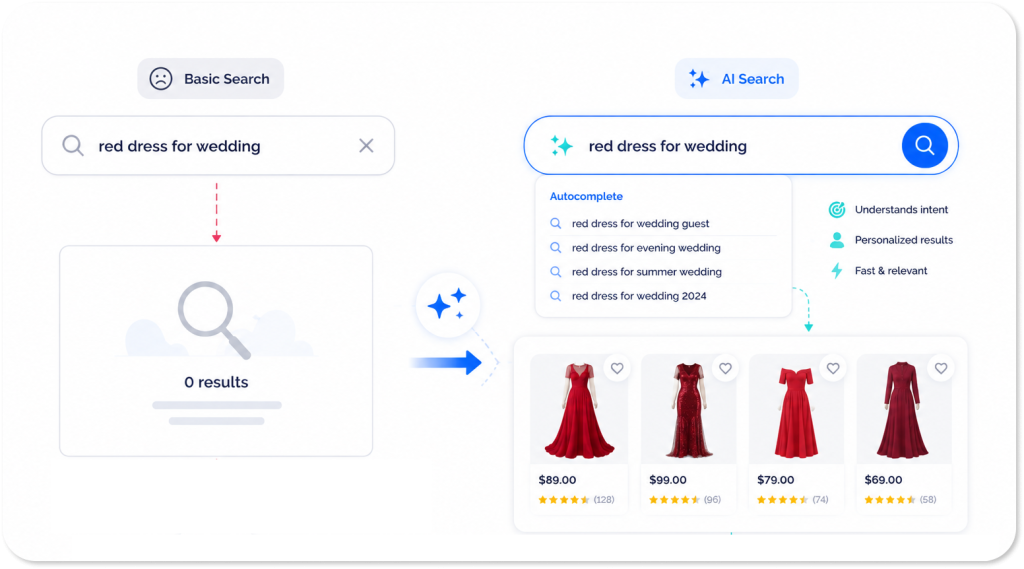
Query processing is what happens between the shopper’s input and the results appearing on screen. A basic search engine matches keywords literally. “Boot” returns products with “boot” in the title. A modern AI-powered search engine interprets intent. It understands that “something warm for hiking” probably means insulated outdoor footwear, even though none of those words appear in your catalogue. Much of this is powered by the kind of natural language understanding that Google’s BERT research helped pioneer, and which has since become the foundation of how modern search engines interpret intent rather than just keywords. It handles typos, synonyms, and natural language queries without needing any manual configuration.
Ranking determines the order results appear in. Early search engines ranked purely by keyword relevance. Modern ecommerce search factors in popularity, conversion rate, stock levels, personalisation signals, and merchandising rules. A product that matches the query but has never been bought ranks differently from a bestseller with hundreds of five-star reviews.
Autocomplete runs in parallel with all of this, predicting what the shopper is about to search and surfacing suggestions that keep them on the path to purchase.
Most of the meaningful differences between a basic search bar and a best-in-class engine live in these layers, not in what the shopper sees on the surface.
Which Ecommerce Search Features Actually Matter?
Not all site search solutions are built the same. These are the features that separate the ones that drive revenue from the ones that just technically function.
Autocomplete and rich suggestions
Autocomplete is the single highest-impact feature in ecommerce search. It reduces the effort required to complete a search, prevents typos before they happen, and guides shoppers toward queries that return strong results. Good autocomplete shows product images, prices, and ratings inline so shoppers can navigate directly to a product without ever hitting a results page.
We cover this in depth in our guide to autocomplete search.
Typo tolerance
Mobile shopping has made typo tolerance non-negotiable. Shoppers on phones make mistakes constantly, and a search engine that returns zero results for “nikee trainers” or “blender recepies” is quietly losing sales every day. Typo tolerance uses fuzzy matching to understand what the shopper meant, not just what they typed.
Synonym handling
Shoppers don’t use your product taxonomy. They search “couch” when your catalogue says “sofa”. They search “trainers” when your catalogue says “sneakers”. Without synonym handling, these searches return nothing even though you have exactly what they want. A well-configured synonym dictionary bridges the gap between how shoppers speak and how your products are catalogued.
Personalisation
Personalised search ranks results based on each shopper’s individual behaviour, their browsing history, past purchases, and real-time session signals. Two shoppers searching “jacket” see different results. The one browsing outdoor gear sees waterproof hiking jackets. The one looking at formal wear sees blazers. Personalisation shortens the path to purchase for both.
Faceted filtering
Faceted filtering lets shoppers narrow results by attributes like size, colour, price, and brand. Done well, it’s one of the most powerful product discovery tools on your site. Done badly, it creates SEO problems and frustrating dead ends. We cover both the UX and the SEO side in our complete guide to faceted filtering.
Zero-results handling
A zero-results page is a failure state, but it doesn’t have to end in abandonment. Good search minimises zero-results rates through typo tolerance, synonym matching, and partial matching. When zero results do occur, smart handling shows alternative suggestions or popular products rather than a blank page. Our no-results page examples guide covers exactly how to handle this well.
Search analytics
You can’t improve what you can’t measure. Search analytics tell you what shoppers are searching for, which queries are returning zero results, which results are being clicked, and where shoppers are dropping off. This data is a direct window into unmet demand and one of the most valuable datasets in your entire store.
How Do You Measure Ecommerce Site Search Performance?
Most stores either don’t measure site search at all, or track one metric and call it done. These are the numbers that actually tell you whether your search is working.

Search usage rate is the percentage of sessions that include at least one search. Industry average sits around 15 to 30% depending on category. If yours is significantly below that, your search bar probably isn’t visible or prominent enough.
Zero results rate is the percentage of searches that return no products. Aim for below 5%. Above that, something is broken: either your product data is incomplete, your synonym dictionary is missing key terms, or your typo tolerance isn’t working. Check your top zero-results queries monthly. They’re a direct list of what shoppers want that you’re failing to show them.
Click-through rate from search results is the percentage of searches that result in at least one product click. Low CTR usually means results are irrelevant, poorly presented, or the shopper gave up and left.
Search-to-cart rate measures how many sessions that included a search ended with a product added to cart. This is the most direct measure of search quality.
Revenue per search session is total revenue divided by the number of sessions that included a search. This is the headline metric for search ROI and the most useful number when making the business case for investing in a better solution.
Google Analytics 4 tracks site search natively. Set it up under Admin, then Data Streams, then Enhanced Measurement, and make sure your search query parameter is configured correctly. Google’s Search Quality Evaluator Guidelines are also worth reading for anyone thinking seriously about what relevance actually means in search, both on-site and off.
How Do You Choose an Ecommerce Site Search Solution?
The market ranges from basic open-source plugins to enterprise AI search platforms. For a broad market overview of what’s available, Gartner’s coverage of digital commerce search is a useful starting point when shortlisting vendors. Here’s what to evaluate once you’re in that process.
Relevance quality is the most important factor and the hardest to assess from a demo. Ask for a trial on your own product catalogue with your own real search queries. Don’t let vendors demo on curated examples.
AI and NLP capabilities. Can it handle natural language queries, synonyms, and typos out of the box? Does it learn from shopper behaviour over time, or does relevance need to be manually tuned?
Integration complexity. How long does implementation actually take? Ask for references from stores on your platform and ask those references specifically about the implementation experience, not just the end result.
Merchandising controls. Can your team boost, pin, or bury specific products without developer involvement? Can you set up rules for sales events or seasonal pushes?
Analytics depth. Does the platform give you query-level data, zero-results tracking, and A/B testing? Or just aggregate metrics that don’t help you diagnose problems?
Support and SLA. For a system this commercially critical, what happens when something breaks? What’s the response time?
Pricing model. Most enterprise search platforms charge based on queries per month, revenue, or catalogue size. Understand what happens to pricing as you scale before you sign anything.
What Does AI-Powered Search Actually Deliver?
The difference between a basic keyword search and a modern AI search engine isn’t theoretical. It shows up directly in revenue.
Bauhaus Czechia, one of Central Europe’s leading DIY retailers, switched to Prefixbox AI Search and saw revenue from search increase by 45%. Same search bar, same product catalogue, same shoppers. The only thing that changed was the quality of the engine underneath.
The reason it works is pretty straightforward. AI search surfaces the right product more often, to more shoppers, earlier in the session. Fewer people hit zero-results pages. More people click the first result. More clicks turn into add-to-carts. The improvement compounds at every step of the funnel.
For a retailer doing meaningful volume through site search, a 45% revenue uplift is one of the highest-ROI changes you can make without touching a single product, price, or marketing budget.
Bringing it all together
Ecommerce site search isn’t a set-and-forget feature. It’s a revenue channel that responds directly to the quality of investment you put into it.
The stores winning on search right now are running AI-powered engines that understand intent rather than just keywords. They’re monitoring zero-results rates and acting on what those queries tell them. They’re using search analytics as a product intelligence tool. And they’re treating the search experience as something worth improving every month, not every few years.
If you want to go deeper on the optimisation side, our ecommerce site search best practices guide is the right next read.
And if you want to see what a modern AI search engine looks like on your own catalogue, Prefixbox AI Search is worth a look.
What is ecommerce site search and why does it matter?
It’s the internal search engine on your online store. It matters because shoppers who use site search convert at up to 6 times the rate of those who browse, making it one of the highest-impact features in your store.
How is ecommerce site search different from Google search?
Google ranks pages across the entire web based on authority and backlinks. Ecommerce site search only searches within your product catalogue, ranking results based on relevance, product popularity, conversion data, and personalisation signals from your own shoppers.
What is a good zero results rate for ecommerce search?
Aim for below 5%. Above that, you likely have gaps in your synonym dictionary, weak typo tolerance, or incomplete product data. Check your top zero-results queries monthly, they tell you exactly what shoppers want that you’re failing to show them.
How much does ecommerce site search software cost?
Basic solutions start at a few hundred dollars per month. Enterprise AI search platforms typically price based on monthly query volume or revenue processed. Always model the pricing against your expected growth before signing anything.
How long does it take to implement a new site search solution?
A Shopify store with clean product data can be live in a few days. A large enterprise catalogue with complex integrations can take several weeks. Ask vendors for timelines from stores similar to yours, not best-case estimates from their sales team.
What is the fastest way to improve ecommerce site search performance?
Fix your zero-results queries first. Pull your top 50 zero-results searches from analytics, identify which represent products you actually carry, and add synonyms to cover them. It can be done in an afternoon and the impact is usually immediate.

Soma is managing wide aspects of Prefixbox’s online presence – let it be social media, content or paid ads. He’s a passionate online marketer based in Budapest, Hungary, with a keen interest in cutting-edge technologies and innovative solutions.