
Faceted Filtering and Faceted Search: Complete Guide for Ecommerce (2026)
Faceted filtering is a search method that lets online shoppers narrow down product listings by selecting multiple product attributes (e.g., brand, price, color) simultaneously, making product discovery faster and more relevant.
When this is true:
- You have a large product catalog with many attributes.
- Shoppers need efficient ways to drill down to specific items.
- You want users to refine results without endless scrolling.
When it’s not necessary:
- Your store only has a few products.
- Simple category filters suffice.
- Advanced search won’t significantly improve findability.
Let’s dive in!

Introduction
If your customer can’t find exactly what they’re searching for, they can quickly become frustrated. Even if you have exactly what they want, if they can’t easily find it (usually due to a complicated interface) they’re simply going to buy it from a competitor that has a better-built site.
Even if you don’t have what they’re looking for, it’s better they find this out as quickly as possible, so they won’t associate the feeling of wasted time with your store. (If you don’t have what they’re looking for, you can always recommend similar products on the 0-results page.)
Shoppers are never going to make perfect searches: their queries will be more like educated guesses as most times they aren’t sure exactly what they’re looking for. Oftentimes, they will only know a few parameters and execute a query in order to get a list of products to look through. Your search and ranking algorithm must be good enough to help them.
Using search filters is the most basic, and efficient, way to do this. A more advanced method encompasses using faceted navigation and faceted search (more on the distinction shortly) together with a user-friendly, not overly complicated interface.
What is Faceted Search and how it works?
Faceted search definition: Faceted search, or guided navigation as it’s sometimes referred to, is a search method that utilizes the metadata attributed to a product in a store, providing visitors an opportunity to filter and refine their search queries when looking for specific products.
Faceted search or navigation is related to filters, but the phrases are not interchangeable as the former is a more flexible and efficient solution. Faceting means creating a complex structure in which shoppers are presented with a smart, logical interface that makes it easier for them to get to the desired products.
Making search easier and faster, multi-faceted search also helps enforce purchase decisions and lower site abandonment rates, leading to higher conversion rates and overall profit.
How does faceted search works?
A faceted search software offers a chance to use filters in a smart way. Traditionally, simple filters are used for site-wide searches: to narrow down results to a certain category, brand etc.
With faceted search, you can actually recommend even more relevant filters to users.
If you have thousands of products in your store, you most likely have tens of thousands of individual attributes associated with them. It would be counterproductive (and impossible) to provide them all as filter options. But based on queries and results, you can help shoppers narrow down their scope by providing relevant filters.
For example, if a shopper runs a site-wide search and 8 out of the 10 most relevant results are in the same category, you can provide a filter that focuses on that category and add additional ones for the most common attributes (acting here as product-specific filters) in that category.
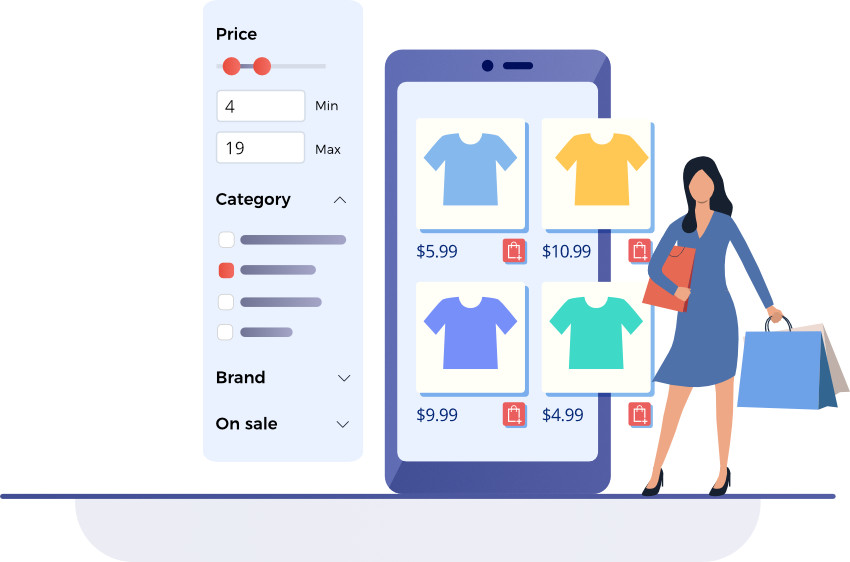
This can significantly improve user experience as it gets as close to actually reading their thoughts as search technology can get today.
We can’t really say that it saves time or clicks for the user because it’s fundamentally different from the most simple search methods.
The point is to provide a better shopping experience. One where the user actually knows they’re getting closer to the product they’re looking for because, with each step, the results and filters become more relevant.
It also provides the user with a sense of control without making the shopping experience too difficult. Shoppers can narrow down search results based on their needs, while not being faced with too many choices (and thus becoming overwhelmed because of the ‘paradox of choice’).
Step-by-Step:
- User enters a search or selects a category.
- System displays initial results plus relevant facets.
- User selects one or multiple filters (e.g., “Men,” “Running Shoes,” “Size 10”).
- Results update immediately to match filters.
- Additional facets refine based on filtered results.
Faceted Search vs Faceted Filtering: What Is the Difference?
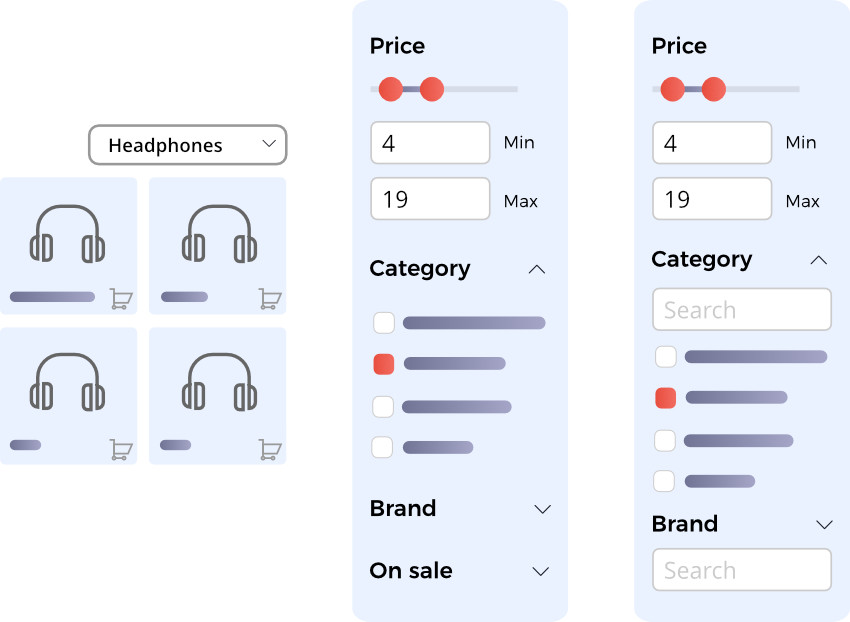
Filters are individual product attributes (e.g., “blue,” “32GB”). Facets are categories of filters (e.g., “color,” “memory size”). Faceted search ties it together, letting users apply multiple attribute filters simultaneously and intelligently refine results.
It’s good to think of the three methods as adding layers of complexity.
Why Use Faceted Filtering on Your Store?
Faceted filtering enhances findability and user experience, lowers frustration, reduces search abandonment, and supports purchase decisions. It keeps shoppers engaged by letting them quickly narrow options to what matters.
Benefits:
- Faster product discovery for users.
- Improved user experience with logical navigation.
- Higher conversion rates as relevant items surface faster.
- Better control for customers over results matching their inte
Faceted Search SEO: How to Implement Facets Without Hurting Your Rankings?
Faceted filtering creates a specific set of SEO challenges. Every filter combination (colour, size, brand, price range) typically generates a new URL. A catalogue with 10,000 products and a dozen filter attributes can produce millions of unique URLs, most of which contain duplicate or near-duplicate content. Left unmanaged this causes three problems: crawl budget waste, duplicate content penalties, and keyword cannibalisation.
Crawl budget
Search engine crawlers have a finite budget for how many pages they will crawl on your site in a given period. If Googlebot is spending that budget crawling thousands of faceted filter URLs like /shoes?colour=red&size=10&brand=nike, it has less budget left for your actual product and category pages. The fix is to block low-value faceted URLs from being crawled using your robots.txt file or by adding a noindex meta tag to filtered pages that have no unique SEO value.
URL parameter handling
The cleanest approach depends on how your facets generate URLs. If filters append parameters (?colour=red&size=10), use Google Search Console’s URL Parameters tool to tell Google how to handle them. If filters generate path-based URLs (/shoes/red/size-10/), use canonical tags pointing back to the base category page (/shoes/) on all filtered variants. This consolidates ranking signals onto the page you actually want to rank.
Avoiding duplicate content
The core rule is: only allow Google to index faceted URLs that have genuine unique search demand. A page for /running-shoes/nike/ may be worth indexing if “nike running shoes” has real search volume. A page for /running-shoes/nike/red/size-10/ almost certainly is not. Use a combination of canonical tags, noindex directives, and robots.txt disallow rules to draw a clear line between indexable and non-indexable facet combinations. Audit this regularly as your catalogue grows.
What Are Best Practices for Faceted Filtering?
Good faceted filtering balances relevance, simplicity, and user expectations. Here’s what works:
Essential Faceted Filtering Best Practices
- Offer common universal facets: like brand, price, size.
- Use category-specific filters: tailor filters to product type.
- Allow multi-selection: let users apply several filters at once.
- Use clear, customer-centric wording: match the language shoppers use.
- Don’t show filters that return zero results: keeps the interface functional.
- Avoid too many facets: only prioritize relevant options.
Common Faceted Filtering Mistakes to Avoid
- Complex, obscure facets shoppers don’t understand.
- Static filters that don’t update based on results.
- Too broad or too many filter options.
How Can Faceted Filtering Impact SEO?
Faceted filtering can positively or negatively affect SEO if not implemented carefully.
When Faceted Filtering Helps
- Filtered URLs target long-tail keywords.
- Internal linking and engagement improve crawl value.
Potential SEO Issues with Facets
- Duplicate content / index bloat: many filter combinations create similar pages.
- Wasted crawl budget: search engines crawling unnecessary URLs.
- Diluted link equity: ranking authority spreads thin across many pages.
Faceted Search SEO Best Practices:
- Use noindex/nofollow for filter URLs that shouldn’t rank.
- Implement canonical tags to signal preferred pages.
- Limit faceted URLs indexed by robots.txt or JavaScript updates.
What Are Common Faceted Filtering Examples?
Top ecommerce sites use faceted filtering to tailor listings based on attributes relevant to categories or searches.
Amazon
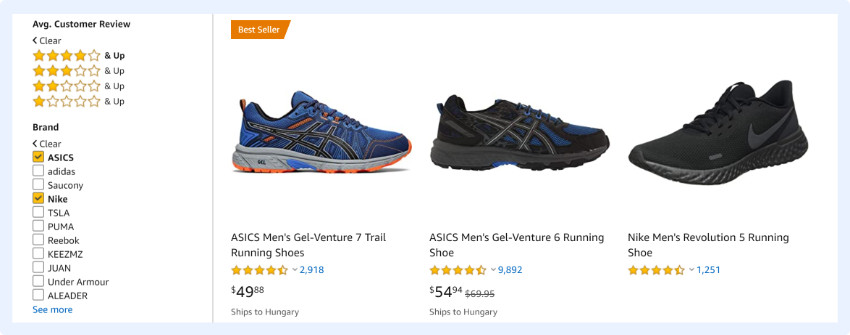
Amazon leverages all the best UX practices for filtering and displays facets right away after you select a category or run a search. All facet options, from the first step, are relevant to the products you’re browsing. For example, if you select the Electronics/Headphones category, these are some of the facet options you get:
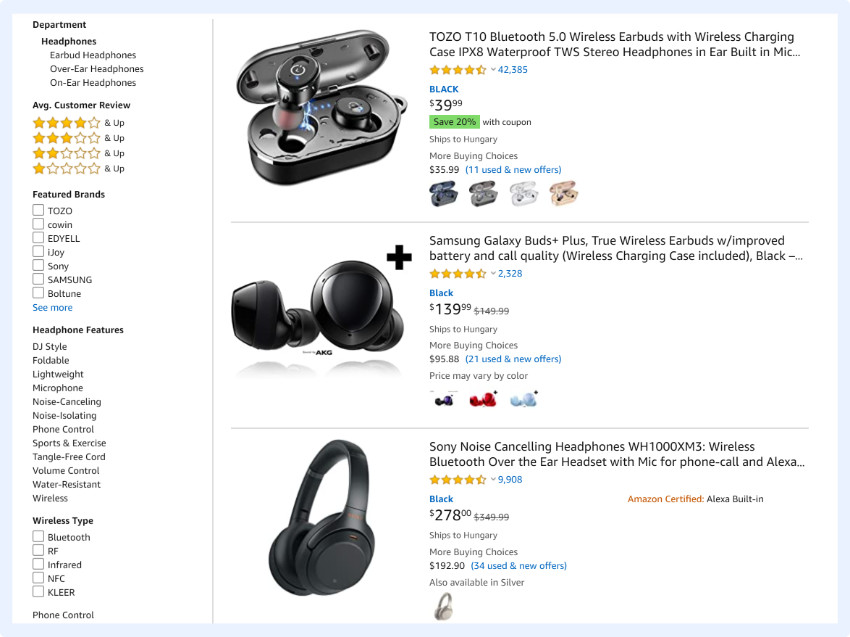
The same applies if you execute a search query. For example, if you search for science-fiction author, Isaac Asimov, the system will understand that your query matches the name of an author in a certain genre and will offer further facet options accordingly:
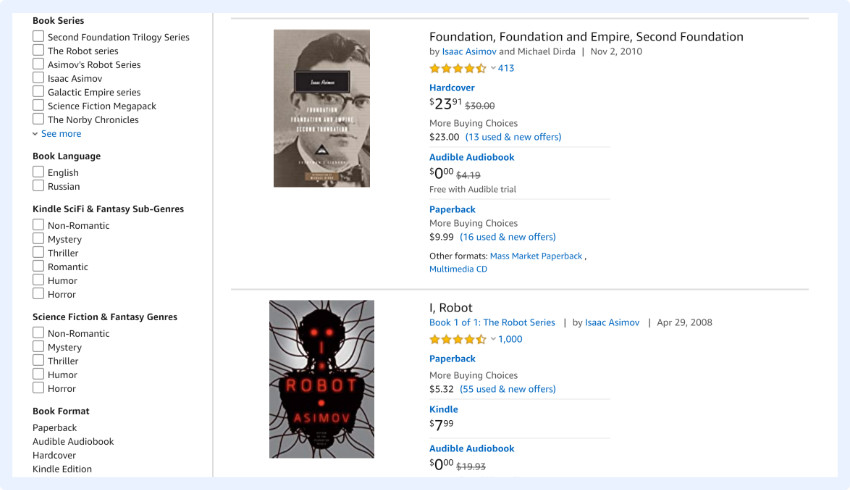
You can also see that they allow the shopper to select multiple facets (e.g. multiple brands) at once.
It would be even more useful if they displayed the number of products under each attribute; this is what most online retailers do.
Zappos
Zappos is a great example of how faceted search should work. Relevant filters appear after you select one of the categories:
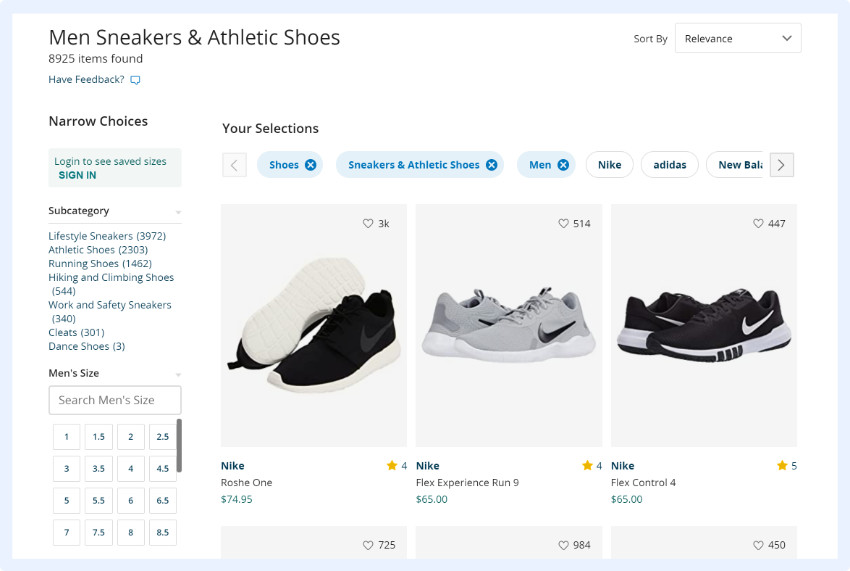
Or after searching for something via the search box:
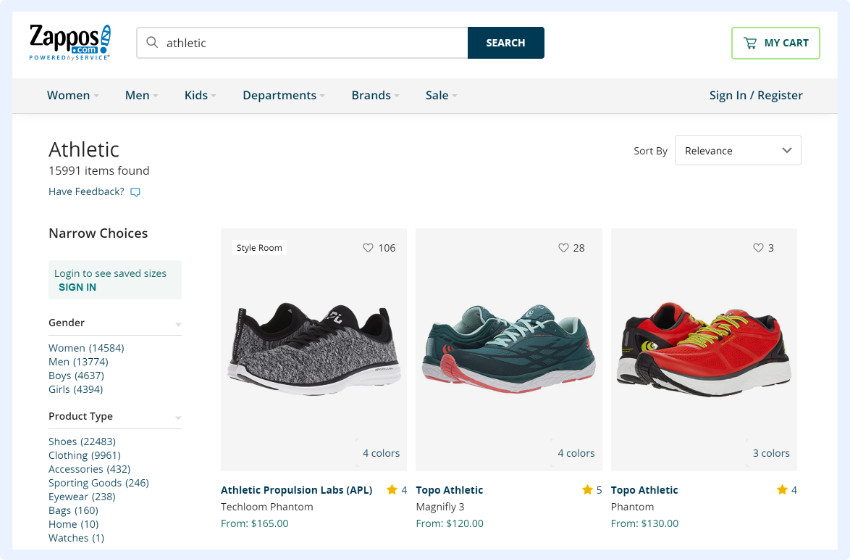
As you can see, there are multiple options that help shoppers narrow their search. As a best practice, all of the filters also inform shoppers about how many products have the specific attributes, providing a scope the number of options there are to choose from.
As you narrow your search and apply more filters, additional filter suggestions appear horizontally on the top of the results page:

These are based on the previously applied filters and are updated with the most relevant products every step of the way.
There are multiple options here to find the product in question:
- You can start with a simple search query
- You can select the category you want to start with
- You can filter results with the vertical faceted search options
- You can also sort by a number of criteria, including New Arrivals, Customer Rating and Best Sellers.
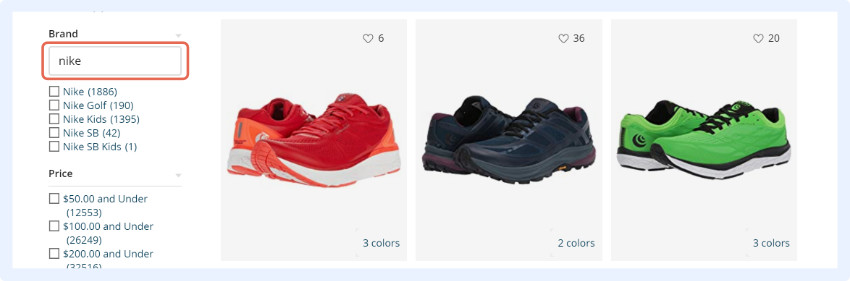
Note that, in addition to selecting criteria from the offered facets, there is also an option in the vertical search box to enter additional criteria in text format. Shoppers can use this to search for specific brands, for example.
This is a good solution if your store has thousands of products and consequently hundreds or thousands of different attributes: the faceted search engine may offer the most relevant ones, but if the user is searching for something that is not there they don’t have to abandon the store, they can just quickly add their own preferred attribute.
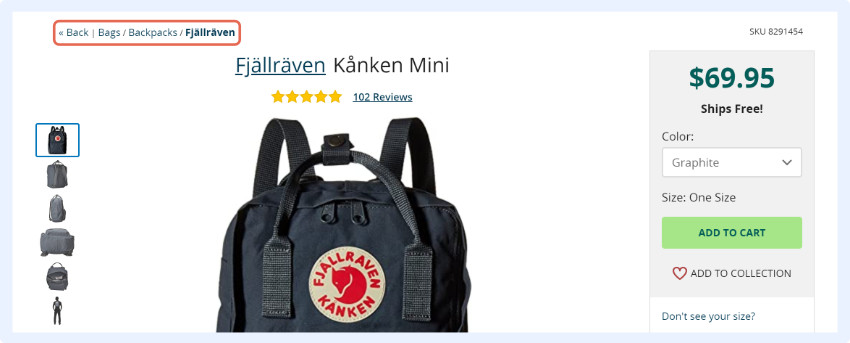
You can improve navigation by including a breadcrumb menu on your site. After a shopper selects a certain product, they will be able to see exactly which category they’re in, which gives them a chance to browse similar products by simply going to a different ‘level’, instead of running another search.
How to Decide If You Need Faceted Filtering?
You should add faceted filtering when your product catalog is large, and users struggle to find specific items via basic search or simple navigation.
Use Facets If:
- You have hundreds or thousands of products with many attributes.
- Shoppers need to filter by complex combinations.
- You want better conversion and retention from search users.
Skip Faceted Filters If:
- Your store has a small catalog (e.g., <200 products).
- Basic category filters solve most findability needs.
- The implementation cost outweighs value for your UX.
If you have any questions regarding faceted search, feel free to ask us any time – we’ve already built a number of search engines for our clients and are always happy to share our knowledge!

Paige is the Head of Marketing at Prefixbox, a leading eCommerce site search solution. She’s an American who’s been living in Budapest since 2017 and loves giving #alwayslearning sessions to help people optimize their online stores.